

The best social media scheduler does more than publish your posts at a preset time. It helps you stay visible, coordinate campaigns, understand performance, and remove hours of repetitive work from your week. That matters in a world with 5.66 billion social media user identities as of October 2025, equal to 68.7% of the global population. That audience also grew by roughly 259 million identities, or 4.8%, in one year.
But scheduling platforms differ dramatically in automation, analytics, collaboration, AI, pricing, and platform support. This guide compares seven strong options and shows you exactly what to check before paying for one.
What Does A Social Media Scheduler Do?
Consider this illustrative case.
Marcus Reed runs marketing for a growing home-improvement company. Every morning, he opened Instagram, Facebook, LinkedIn, and TikTok separately. He copied captions between tabs, hunted for images, checked a spreadsheet for campaign dates, and tried to remember which posts had already gone live.
At first, the system seemed manageable. As the company’s campaigns increased, Marcus started missing publishing times. Some posts appeared twice, others never went live, and campaign approvals disappeared inside email threads. He was spending several hours each week administering social media instead of improving the content.
After centralizing the workflow in a scheduler, he could prepare content in batches, see upcoming posts on one calendar, send drafts for review, and examine results without switching between several dashboards.
Marcus is fictional, but the workflow problem is common.
A social media scheduler gives you one place to prepare content ahead of time and arrange when it should appear. Depending on the software, you can also manage multiple networks, collaborate with colleagues, respond to engagement, recycle evergreen content, generate drafts with AI, and analyze performance.
That centralization matters because the typical online adult spends about 18 hours and 36 minutes each week across social networks and video feeds. People also use an average of 6.75 social platforms per month. Your audience is fragmented, which makes manual publishing harder as the number of channels you manage grows.
A basic native scheduler may work when you manage one or two accounts. Once you handle multiple brands, campaigns, employees, clients, or approval stages, a dedicated platform becomes much more useful.
Here is where a paid scheduler earns its place.
- Centralized scheduling: You prepare posts for several networks without rebuilding your calendar separately on every platform.
- Better consistency: You can plan days or weeks ahead instead of depending on someone being available at the exact publishing time.
- Approval workflows: Your writer, designer, manager, or client can review content before publication. This reduces accidental or off-brand posts.
- Analytics: You can compare reach, engagement, clicks, follower growth, and content performance instead of treating publishing as the finish line.
- Automation: Advanced tools can recommend publishing times, recycle selected content, generate variations, or streamline repetitive campaign tasks.
- Team access: Rather than sharing passwords, you can give people specific levels of access where supported.
- Campaign visibility: A calendar makes overlapping promotions, content gaps, and overloaded publishing days easier to spot.
Paying for software makes sense when the time saved, errors avoided, or insights gained are worth more than the subscription. It does not make sense to pay for enterprise listening, approval, or reporting functions that your team will never use.
Must-know Tip: DataReportal chief analyst Simon Kemp offers a useful reminder: “A marketer’s job is not to deliver novelty; it’s to deliver results.”
That is exactly how you should judge scheduling software. Buy the workflow that produces better results, not the longest feature list.
Measuring Whether Scheduling Is Actually Working
Installing a scheduler does not automatically improve your social media performance. You need a before-and-after measurement framework.
Start with posting consistency. Record how many planned posts actually went live before adopting the scheduler, then compare the percentage after 30, 60, and 90 days. A better workflow should reduce missed publishing dates and unexplained gaps.
Next, measure reach. Compare average reach or impressions per post by platform and content format. Do not assume higher posting frequency equals better performance.
Then examine engagement. Track comments, shares, saves, replies, and engagement rate rather than likes alone. These signals show whether more consistent publishing is creating meaningful audience interaction.
Move from engagement to clicks. Use campaign tracking and platform analytics to determine how many people move from a scheduled post to your website, product page, signup page, or other destination.
Then evaluate conversions. Measure purchases, leads, registrations, downloads, demos, or whatever outcome matters to your business. More than 30% of adult internet users discover new brands, products, or services through social advertising, which makes downstream measurement essential.
Also check follower quality, not just follower count. Look for relevant new followers who continue engaging, clicking, or converting. A rapidly growing but inactive audience contributes little business value.
Finally, calculate workflow time saved. Compare the hours spent planning, posting, requesting approvals, gathering reports, and correcting errors before and after adoption.
Your measurement sequence should therefore be:
Posting consistency → Reach → Engagement → Clicks → Conversions → Follower quality → Time saved.
If the tool saves hours but business results stay flat, improve your content strategy. If results improve while workload falls, your scheduler is doing its job.
7 Best Social Media Scheduler
Choosing the best social media scheduler becomes easier when you stop looking for one tool that wins every category. A creator may value affordability and effortless publishing, while an agency may care more about approvals, client workspaces, reporting, and permissions. An enterprise team may prioritize monitoring and customer care.
The seven platforms below solve different parts of that problem. Socialschedulify takes our top position because its verified feature set combines publishing with campaigns, share amplification, AI assistance, analytics, and team workflows. The remaining choices stand out in areas such as simplicity, enterprise management, approvals, evergreen content, and reporting.
1. Socialschedulify
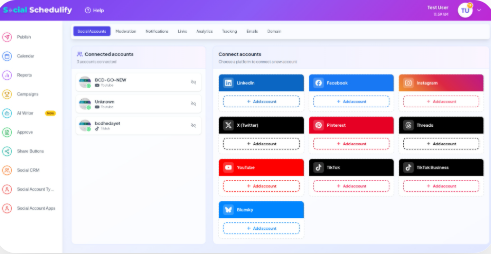
Socialschedulify takes a broader approach than a basic publishing calendar. Along with scheduling, its current feature set includes a visual calendar, AI-supported publishing, evergreen recycling, collaboration workflows, campaign-building tools, share amplification, and advanced analytics.
That combination is useful when you want social publishing and campaign execution closer together. Instead of paying for a scheduler while separately handling contests, sharing tools, and campaign reporting, you can manage more of that work inside one environment.
Its campaign functionality is one of its more interesting differences. Socialschedulify lists a drag-and-drop campaign builder, automated winner selection and fraud detection, viral sharing and rewards, real-time campaign analytics, and CRM integration. Those features can be valuable when contests, giveaways, referral activity, or audience acquisition form part of your growth strategy.
The analytics layer also goes beyond simply showing whether a post received likes. The platform lists real-time monitoring, trend predictions, competitor benchmarking, ROI tracking and attribution, plus automated reporting. For you, that creates a clearer connection between publishing activity and business performance.
Socialschedulify Highlighted Features
- Smart publishing: Schedule content from a centralized dashboard and use AI-optimized publishing times to improve timing decisions.
- Visual content calendar: Drag-and-drop scheduling with weekly and monthly views helps you spot gaps and organize campaigns faster.
- Evergreen content recycling: Reuse selected evergreen posts automatically instead of constantly rebuilding recurring content.
- Viral campaign builder: Create contests, giveaways, referral campaigns, rewards, and winner workflows from the same platform.
- Share amplification: Customizable share buttons, A/B testing, share counts, and heat mapping can help you encourage and measure content sharing.
- Advanced analytics: Monitor performance, benchmark competitors, track ROI, and generate reports without piecing together several reporting systems.
- Team collaboration: Approval workflows give teams a structured way to review social content before it reaches the public.
Pros of Socialschedulify
- Combines scheduling and campaign-building capabilities in one product.
- Offers AI-supported publishing rather than limiting automation to caption writing.
- Includes an evergreen recycling system for repeatable content.
- Provides share amplification tools that typical publishing-only schedulers may not emphasize.
- Supports analytics with ROI tracking and competitor benchmarking.
- Gives teams approval workflows for better publishing control.
- Offers plans for creators through agencies instead of forcing every customer into the same account structure.
Cons of Socialschedulify
- Its website currently presents inconsistent account-limit information. The feature FAQ says unlimited account connections, while the pricing table specifies 5, 15, 30, and unlimited profiles depending on plan. Check the allowance attached to your chosen plan before purchasing.
- Teams that only need a basic posting queue may not use campaign building, share amplification, ROI tracking, or other broader features.
Socialschedulify Pricing Plans
Starter costs $9 per month and supports up to 5 social profiles. It includes basic scheduling, the content calendar, share-button integration, basic analytics, and email support.
Professional costs $29 per month and supports up to 15 profiles. It adds smart publishing, AI content generation, user-generated-content tools, campaign creation, advanced analytics, and priority support.
Business costs $59 per month and supports up to 30 profiles. It includes advanced scheduling, UGC management, the viral campaign builder, share amplification, ROI tracking, and team collaboration.
Agency costs $99 per month and includes unlimited social profiles, multi-client workspaces, white-label options, campaign automation, CRM integrations, custom analytics reports, and dedicated support. Annual billing is advertised with a 20% saving, and a 14-day free trial is available.
2. Buffer:
Buffer is a strong choice when you value simplicity. Its current platform combines content ideas, scheduling, analytics, community engagement, collaboration, an AI assistant, and integrations while supporting channels including Instagram, Facebook, TikTok, LinkedIn, X, YouTube, Threads, Pinterest, Bluesky, Mastodon, and Google Business Profile.
Its main consideration is pricing structure. Paid plans charge per connected channel, so the cost rises as you add social accounts. That model is easy to understand for a small setup but deserves careful calculation if you manage many client accounts.
Buffer’s own 2026 analysis of more than 100,000 users found that regular posters received about five times more engagement than inconsistent users. Its Instagram analysis also found that moving from 1–2 posts a week to 3–5 was associated with roughly 12% more reach per post.
Buffer Features
- Publishing queue: Build an organized queue and schedule posts ahead of time.
- Visual calendar: See upcoming posts across weeks or months.
- AI Assistant: Create, refine, and repurpose social copy.
- Insights: Review follower growth, engagement, impressions, and post performance.
- Community: Reply to comments and use saved or AI-assisted responses on supported channels.
Pros of Buffer
- Clean workflow that is approachable for beginners.
- Free plan for up to three channels.
- Broad range of supported social networks.
- Paid plans provide unlimited scheduled posts subject to fair-use limits.
- Team plan includes unlimited team members and approval workflows.
Cons of Buffer
- Per-channel billing becomes more expensive as your account portfolio grows.
- Free accounts are limited to 10 queued posts per channel.
- Essentials includes only one user.
- Some advanced collaboration features require the Team plan.
Buffer Pricing Plans
Free costs $0 and supports up to 3 channels with 10 scheduled posts per channel.
Essentials costs $5 per channel per month when billed annually, or $60 yearly per channel.
Team costs $10 per channel per month when billed annually, or $120 yearly per channel. It adds unlimited team members, access controls, and approval workflows.
3. Hootsuite:
Hootsuite remains a capable option when your job extends beyond publishing into monitoring, engagement, analytics, and larger social operations. Current plans can include unlimited posts, AI-assisted content, a unified inbox, competitor monitoring, workflow automation, forecasting, approvals, and advanced enterprise capabilities.
The tradeoff is complexity and cost. A smaller team that mainly wants a calendar and automatic publishing may end up paying for a larger management environment than it actually needs.
Hootsuite Features
- Cross-network scheduling: Plan and publish social content from one interface.
- Unified inbox: Bring supported conversations into a centralized engagement workflow.
- AI assistance: Generate social copy and images within the publishing process.
- Monitoring: Track brand and competitor activity.
- Team workflows: Higher plans add approval, routing, and coordination capabilities.
Pros of Hootsuite
- Broad social media management capabilities.
- Strong fit for larger publishing operations.
- Combines scheduling and engagement management.
- Offers competitor and brand monitoring.
- Higher tiers provide structured team workflows.
Cons of Hootsuite
- Can be excessive for a solo creator who only needs scheduling.
- Several workflow capabilities sit on higher plans.
- Enterprise functionality can require a sales conversation.
- Total cost can become substantial for advanced requirements.
Hootsuite Pricing Plans
Hootsuite’s public 2026 materials currently show pricing that can vary by page, market, and plan presentation. Because the complete current dollar price for every named plan could not be verified consistently from its pricing page, exact figures are intentionally not reproduced here rather than presenting potentially inaccurate pricing.
4. Sprout Social
Sprout Social targets businesses that need publishing plus deeper engagement, reporting, monitoring, customer care, and collaboration. Its Professional and Advanced tiers expand into competitor insights, AI assistance, sentiment, productivity reporting, API access, and helpdesk integrations.
Its biggest barrier is easy to identify: price. Paid plans use per-seat pricing, and Standard begins at $199 per seat per month on annual billing. That can put Sprout outside the practical budget of smaller teams even when they like the feature set.
The broader need for fast social management is real. Sprout’s 2026 research says 50% of consumers are likely to first hear about a brand crisis on social media, while 84% say response speed affects their perception of a brand.
Sprout Social Features
- Publishing and planning: Schedule content and coordinate your publishing calendar.
- Smart Inbox: Centralize supported inbound messages and engagement.
- Social monitoring: Standard includes keyword and location monitoring.
- Reporting and insights: Analyze profile, post, competitor, paid, and tag performance depending on plan.
- AI and automation: Higher tiers provide AI-assisted post and reply functions.
Pros of Sprout Social
- Strong reporting and analytics depth.
- Built for both publishing and customer engagement.
- Unlimited profiles from the Professional plan upward.
- Mature team and customer-care capabilities.
- Enterprise options include onboarding and priority support.
Cons of Sprout Social
- High per-seat cost for smaller businesses.
- Essentials and Standard cap connected profiles at five.
- Premium Analytics and Listening are separate add-ons.
- Costs increase as you add users and premium capabilities.
Sprout Social Pricing Plans
Essentials costs $79 per seat per month with annual billing or $99 when billed monthly.
Standard costs $199 per seat per month with annual billing.
Professional costs $299 per seat per month with annual billing.
Advanced costs $399 per seat per month with annual billing.
Enterprise uses custom pricing. Sprout currently provides a 30-day free trial without requiring a credit card.
5. Planable:
Planable is particularly strong when content must pass through several people before publication. Its workflow centers on planning, discussion, approval, publishing, engagement, and analysis, making it appealing to agencies and brands where feedback can otherwise become scattered across email, chat, and spreadsheets.
The concern is that analytics and the social inbox can be separate paid add-ons. You should include those extras when comparing the real cost against tools where similar capabilities are bundled.
Planable Features
- Visual content calendar: Organize upcoming campaigns and posts in one schedule.
- Approval workflows: Route content through structured review processes.
- Collaboration: Keep feedback and discussion attached to the content.
- Multiple views: Use calendar, feed, or grid views depending on your plan.
- Publishing: Schedule content across major networks from centralized workspaces.
Pros of Planable
- Excellent emphasis on content approvals.
- Unlimited users on its paid plans.
- Easy-to-follow visual content workflow.
- Useful for agencies managing separate client workspaces.
- Free option lets you test the workflow before committing.
Cons of Planable
- Pricing is charged per workspace.
- Basic has a monthly post limit.
- Basic supports fewer connected social pages than Pro.
- Analytics and inbox functionality can add to your subscription cost.
Planable Pricing Plans
Basic costs $33 per workspace per month on the currently displayed monthly option.
Pro costs $49 per workspace per month.
Enterprise uses customized pricing. Planable also offers a free option based on the first 50 posts you create, without a fixed trial expiration.
6. SocialBee
SocialBee is a practical option if evergreen publishing and content organization are high priorities. Its plans combine publishing with content categories, AI generation, analytics, hashtag organization, bulk editing, CSV uploads, approvals, and multi-workspace options depending on tier.
Its account and workspace limits are tier-based, so an agency may need one of the more expensive Pro agency plans as its client portfolio expands.
AI is becoming hard to ignore in this category. Sprout’s 2026 trends research reports that 97% of marketing leaders believe marketers need to know how to use AI. The important question is no longer whether a scheduler has AI, but whether its automation fits your actual publishing process.
Must-know Tip: Marketing leader Kara Redman summarizes the human side well: “As AI content goes up, our desire for content that feels human will become more in demand.”
SocialBee Features
- Content categories: Organize posts into repeatable topic groups.
- AI content generation: Generate social content without a separate writing application.
- Bulk management: Edit multiple posts and import content through CSV.
- Post approvals: Add a review stage before content is published.
- Analytics: Higher plans provide advanced reporting and up to two years of data.
Pros of SocialBee
- Strong evergreen content organization.
- Unlimited AI content generation is listed across current paid tiers.
- Pricing offers options for individuals through agencies.
- Bulk editing and CSV tools support larger content calendars.
- Higher plans include approvals and report exports.
Cons of SocialBee
- Bootstrap supports only five social profiles.
- Accelerate still includes only one user per workspace.
- Larger agencies may need substantially more expensive agency tiers.
- Extra users, workspaces, and profiles can carry additional fees.
SocialBee Pricing Plans
Bootstrap costs $29 per month, Accelerate costs $49 per month, and Pro costs $99 per month.
Agency plans cost $179 per month for Pro50, $329 for Pro100, and $449 for Pro150. Annual subscriptions reduce the monthly equivalent to $24.20, $40.80, $82.50, $149.20, $274.20, and $374.20 respectively. SocialBee also offers a 14-day Pro trial.
7. Metricool:
Metricool earns its place when reporting and multi-brand analysis matter as much as scheduling. Its paid plans combine publishing with competitor analysis, historical analytics, reporting, integrations, and, on Advanced, team/client management and post approvals.
There are two cost details to watch. X functionality can involve an add-on, and advanced collaboration features such as roles and approvals require the Advanced tier. That makes the entry price less representative if your requirements extend beyond individual scheduling.
Metricool Features
- Planner: Schedule and manage upcoming social content.
- Analytics: Review performance with extended historical data on paid plans.
- Competitor analysis: Benchmark performance against selected competitor accounts.
- Reporting: Generate PDF and PowerPoint reports.
- Team workflows: Advanced adds client management, roles, and post approvals.
Pros of Metricool
- Strong analytics emphasis.
- Supports multi-brand management.
- Useful reporting formats for client work.
- Advanced tier includes approval workflows.
- Integrates with tools such as Canva and Google Drive.
Cons of Metricool
- Free plan has notable network and publishing restrictions.
- X functionality can require an additional paid add-on.
- Approval workflows require Advanced.
- Brand-based price steps can increase costs as your client portfolio expands.
Metricool Pricing Plans
Free costs $0.
Starter starts at $20 per month with annual billing for up to 5 brands and costs $36 for up to 10 brands.
Advanced starts at $53 per month for up to 15 brands, $85 for 25 brands, and $159 for 50 brands with annual billing.
Custom uses tailored pricing for larger requirements.
How to Choose the Best Social Media Scheduler
Start with your workflow, not the product homepage.
List the networks you actively use, how many profiles you manage, who creates content, who approves it, what analytics you actually review, and which repetitive jobs consume the most time.
Then investigate the details competitors often hide behind phrases such as “supports Instagram” or “unlimited publishing.”
Check Post-Type Support
Supporting a social network does not mean a scheduler supports every native feature on that network.
Stories, Reels, carousels, collaborators, first comments, custom covers, tagging options, music, polls, and newer platform functions can behave differently because third-party tools depend on each network’s API.
Before subscribing, test the exact content formats you publish most often.
Calculate the Real Cost at Your Future Size
Do not compare only entry prices.
Buffer charges per channel. Sprout Social charges per seat. Planable charges per workspace. SocialBee uses profile, user, and workspace limits. Metricool scales around brands. Socialschedulify uses profile allowances across its published pricing tiers.
Calculate what your setup will cost today and after adding more profiles, users, or clients.
Must-know Tip: Buffer writer Rochi Zalani makes the point simply: “Don’t just look at the current price of social media management tools.”
Ask What Happens When Publishing Fails
No scheduler eliminates platform outages, expired permissions, rejected media, API changes, or disconnected accounts.
Check whether the platform alerts you quickly when a scheduled post fails. Find out whether it retries automatically, explains the error, or requires you to publish manually.
A failed post you discover three days later is not automation.
Review Security and Permissions
If multiple employees or clients use the system, look for role-based permissions, approval levels, audit trails, two-factor authentication, and a clear way to remove former users.
You should not have to give every collaborator complete control of every social account.
Keep Humans in the AI Workflow
AI can speed up ideation and rewriting, but it should not automatically become your brand’s final editor.
In Sprout’s Q3 2025 Pulse research, 52% of social users expressed concern about brands publishing AI-generated social content without disclosure. At the same time, 65% said they were comfortable with AI being used to provide faster social customer service, according to its Q4 2025 research.
The lesson is not “avoid AI.” Use it where it improves speed, then put human judgment between generation and publication.
Check Accessibility
Review whether your workflow supports accessibility practices such as alt text, captions, subtitles, descriptive copy, and readable visual assets.
An efficient publishing system should not make your content less usable for part of your audience.
Plan for Migration
If you already use another scheduler, find out what can actually move.
Queued posts, drafts, media libraries, tags, approval rules, reporting history, client workspaces, saved responses, and user permissions may not transfer automatically.
The smoother your migration plan, the less likely you are to lose content or disrupt an active campaign.
Conclusion
Finding the best social media scheduler is not about choosing the product with the longest feature page. It is about removing friction from your publishing process while gaining enough control, insight, and automation to improve the work you already do.
Socialschedulify stands out in this comparison because its current toolkit stretches beyond basic scheduling into campaign building, share amplification, evergreen automation, analytics, ROI tracking, and collaboration. Buffer remains attractive for simplicity, Sprout Social for premium management, Planable for approvals, SocialBee for evergreen organization, Metricool for analytics, and Hootsuite for broader social operations.
Before you buy, test your actual workflow. Connect the networks you use. Schedule your real content formats. Invite the people who need access. Review the analytics. Then choose the platform that saves you time without sacrificing control.
Frequently Asked Questions About Social Media Schedulers
What is a social media scheduler?
A social media scheduler is software that lets you prepare social posts in advance and arrange when they should be published. Many modern platforms also provide calendars, analytics, collaboration, AI assistance, engagement tools, and reporting.
What is the best social media scheduler overall?
For this comparison, Socialschedulify ranks first because its verified feature set combines scheduling with campaign creation, share amplification, AI optimization, analytics, and collaboration. Your best option can still change depending on your budget, team size, networks, and workflow.
What is the best free social media scheduler?
Buffer is one strong free option. Its current Free plan lets you connect up to three channels and hold up to 10 scheduled posts per channel at a time.
Is a paid social media scheduler worth it?
Yes, when it saves enough working hours, prevents publishing errors, improves collaboration, or provides data you can use to increase business results. If you manage only one account and post occasionally, native scheduling may be enough.
Can I schedule all my social media posts from one place?
You can manage many networks from one scheduler, but exact support varies by software and post type. Always confirm support for the platforms and formats you use most.
Is it better to use a scheduler or post manually?
Scheduling is better for planned, recurring, and campaign content because it improves consistency. Manual posting still makes sense for spontaneous updates, real-time events, sensitive responses, and native features that third-party APIs do not support.
Do social media schedulers hurt engagement?
Using a scheduler does not automatically reduce engagement. Content relevance, creative quality, timing, audience fit, and your interaction with followers matter far more than whether you clicked “publish” manually.
What features should I look for in a social media scheduler?
Prioritize platform support, scheduling, calendar usability, analytics, approvals, permissions, reliability, reporting, integrations, and pricing at your expected scale. Add AI, social listening, inbox management, or campaign features only when your workflow needs them.
How far in advance should I schedule social media posts?
There is no universal period. Many teams prepare evergreen and campaign content days or weeks ahead while leaving room for timely posts, news, community conversations, and unexpected events.
Can a social media scheduler manage multiple accounts?
Yes. Every tool reviewed here supports multiple social profiles in some form, although profile limits and pricing structures vary by plan. Always calculate the cost using your actual number of accounts.
Can social media scheduling tools generate content with AI?
Several current products include AI assistance, including Socialschedulify, Buffer, Sprout Social, SocialBee, and Hootsuite. The depth differs, so assess whether the AI handles ideation, rewriting, timing, replies, analysis, or other tasks you actually need.
How do I know whether my scheduler is producing ROI?
Compare results before and after adoption. Track publishing consistency, reach, engagement, clicks, conversions, follower quality, errors prevented, and employee time saved. Then compare the measurable value with the subscription and implementation cost.
Should agencies use the same scheduler as small businesses?
Not necessarily. Agencies often need client workspaces, approval workflows, more profiles, permissions, reporting, and multi-user access. A small business may be better served by a simpler product that does not charge for capabilities it will rarely use.